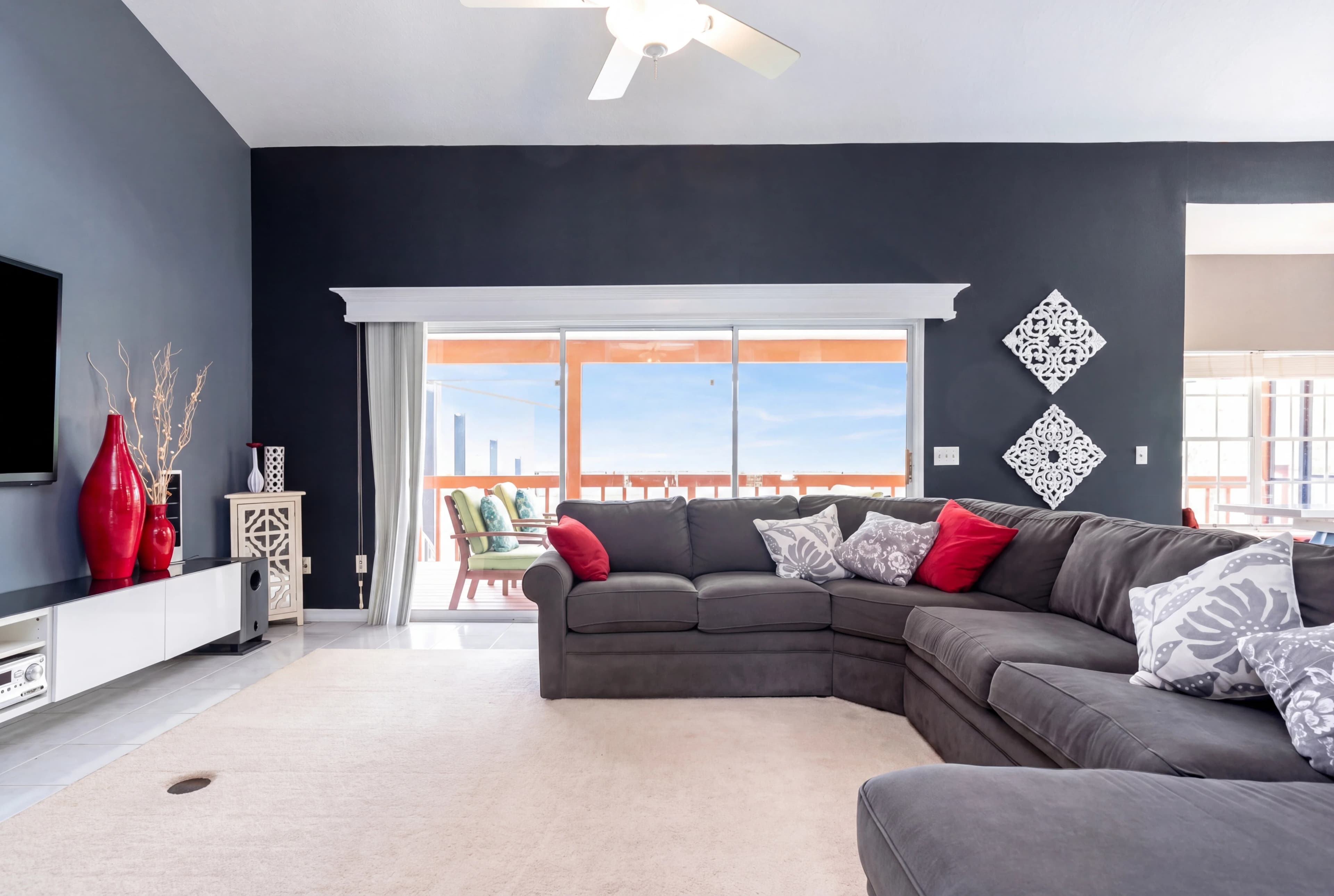
In real estate photography, windows are the most challenging element in any interior shot. The camera can't do what the human eye does effortlessly — adjust its exposure across different zones of the frame simultaneously. Point it at a bright window and the room falls into darkness. Expose for the room and the window blows out to a featureless white rectangle.
That white rectangle is a problem. Buyers see a window-lit living room with nothing outside. It looks closed-in, institutional, uninviting. The natural light that makes a room feel good is gone — replaced by a harsh, blown-out glow.
Window pull editing restores what was actually there. fotolabs identifies every window in your interior photo, recovers the tonal information in those regions, and presents both a properly exposed room interior and a natural exterior view through the glass — just as you would have seen it standing in the room yourself.
Why windows blow out in interior real estate photography
The physics are straightforward. A typical overcast exterior on a cloudy day is 3–5 stops brighter than a properly lit interior room. On a sunny day, that gap widens to 7–10 stops. A camera sensor has roughly 12–14 stops of dynamic range total. That means when you expose for a room interior at the proper brightness, a sunny window hits the sensor at 7–10 stops above middle gray — well past clipping, well past any tonal recovery possible in post-processing from a JPEG.
Professional photographers address this several ways:
- Shooting brackets: Multiple exposures at different settings, blended in post (requires HDR workflow, adds 15+ minutes per room)
- Flash fill: Off-camera flash to raise the interior brightness, closing the gap with the exterior (requires equipment, setup, and skill)
- Natural light scheduling: Shooting rooms with north-facing windows first, managing the shoot sequence around the sun's position
- Window masking: Compositing a separate exterior exposure into the window area in Photoshop (requires skilled retouching, $2–$5 per window outsourced)
fotolabs handles this automatically. Upload your single-exposure interior shot and let the AI perform the window pull — no brackets, no flash calculations, no Photoshop compositing skills required.
How fotolabs AI window pull works
The process involves three technical stages that happen automatically:
Stage 1 — Window detection: The model identifies all window openings in the frame using edge detection, luminance mapping, and semantic understanding of interior architecture. It correctly identifies windows vs. other bright elements (skylights, white walls, open doorways) using geometric and contextual cues.
Stage 2 — Tonal recovery and reconstruction: In the detected window regions, the model performs two operations:
- Recovery: Where tonal information exists at the edge of highlight clipping (partially blown windows, translucent curtain texture), the model recovers and amplifies that data
- Reconstruction: Where the window is fully blown out (pure white, no tonal data), the model generates a realistic exterior view using inpainting informed by the visible exterior elements in the shot (sky color at room corners, reflected light color temperature, window geometry)
Stage 3 — Global tone balance: The interior exposure is adjusted to balance correctly with the recovered window region. Rooms that were slightly underexposed (to avoid blowing windows) are brought up to a natural brightness. The final image shows both the room and the exterior view in a single coherent, properly exposed photo.
Window pull scenarios and expected results
Results vary based on the source photo quality and window exposure level:
Partially blown windows (most common) Windows where some tonal information remains — blown in the center but not at the edges, translucent curtains visible, partial sky tones present. Recovery is excellent. The model reconstructs the full exterior from the remaining tonal data. Results are nearly indistinguishable from a bracketed exposure blend.
Fully blown windows, outdoor scene visible from other angles Windows that are entirely white but where the exterior can be inferred from other elements in the shot (reflected light color temperature, visible sky through a nearby open door). Recovery is very good. The model synthesizes a plausible exterior view that matches the visible environment cues.
Fully blown windows, no exterior context A pure white rectangle with no recoverable tonal data and no contextual cues about the exterior. Recovery is good but involves more AI reconstruction — the model generates a natural-looking exterior (typically: sky visible above, some vegetation or yard below) based on learned priors about residential properties. Reviewers in test groups consistently rate the results as "realistic," but accuracy to the specific exterior depends on what was actually outside.
Windows with sheer curtains Sheer curtains partially block the exterior view, creating a diffused image rather than a clear window view. fotolabs handles this by showing the curtain texture intact while subtly recovering the exterior tones visible through the fabric. The result looks like a properly exposed sheer-curtain window, not a solid white or a transparent cutout.
Per-window pricing vs. fotolabs
The industry standard for outsourced window pull is a per-window charge. BoxBrownie charges $1.60 per standard window pull on top of the per-image editing fee. That means:
- 10-image interior shoot: $16 editing + $25 window pull (5 windows per room average) = $41
- 30-image full-property shoot: $48 editing + $75+ window pull = $123+
These are recurring per-listing costs.
fotolabs pricing:
- Essential ($25/listing): 50 images, all features including window pull, no per-window charge
- Ultimate ($30/listing): 100 images, 5 touch-ups
For a 30-image shoot with full window pull: $25 total, same session delivery.
Combining window pull with other edits
Window pull integrates cleanly with the rest of the fotolabs editing pipeline:
Window pull + HDR: Run both together on high-contrast interior shots. The HDR pass handles the overall zone exposure balance; window pull specifically ensures window regions are recovered at maximum quality.
Window pull + Sky Replacement: Replace the view outside the window with a different sky (e.g., a grey exterior visible through the window can be sky-replaced to show blue sky, matching a separately sky-replaced exterior shot of the same property).
Window pull + Virtual Staging: If you're staging an empty room, the window pull ensures the staged result shows proper exterior context through windows — not a plain white background.
Try window pull free
Upload an interior listing photo with bright windows and see how fotolabs handles the recovery. The free plan includes 30 processed images per listing, watermarked — enough to evaluate window pull on your actual listing photography before committing to a paid plan. No credit card required.