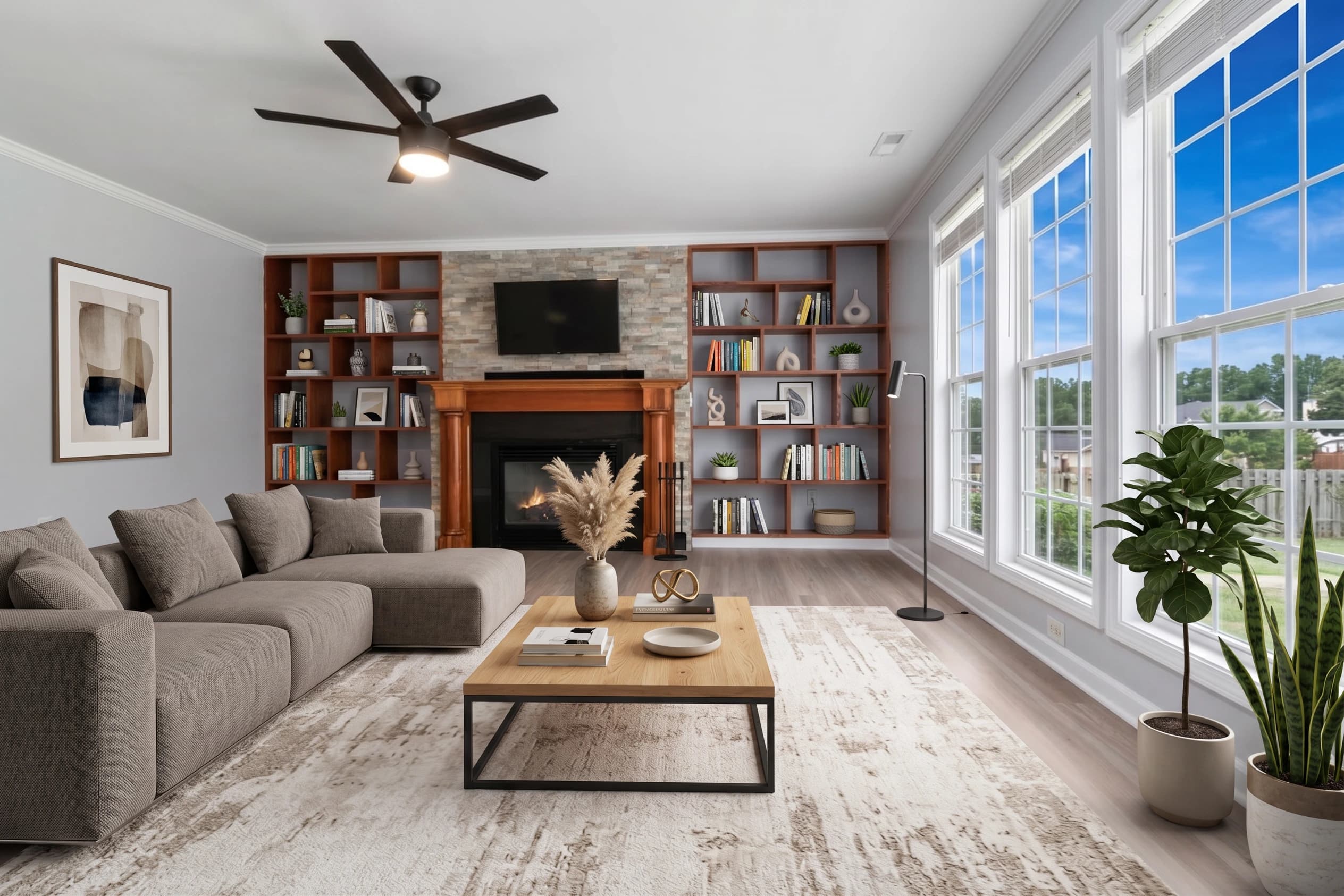
The Virtual Staging style is fotolabs' answer to the biggest visual problem in real estate marketing: empty rooms don't sell homes. Buyers walk into a vacant listing, scroll through 30 photos on Zillow, and can't picture themselves there. The Virtual Staging style fixes that in 30 seconds — no designer, no $50/room invoice, no 48-hour wait.
This page covers what the style does, how to use it, and what to expect when you ship the output to your MLS.
What this style does
Pick the Virtual Stage template on any uploaded photo and our model does three things in sequence: identifies the room type (bedroom, living room, dining room, office), recognizes the architectural geometry (walls, windows, doors, baseboards, flooring, light direction), and generates a photorealistic furnished version that respects every constraint of the original photo.
The result is a staged image where:
- Vertical lines stay vertical — no warped doorframes, no leaning walls.
- Floors and ceilings are physical — no carpet bleeding into the wall, no rugs floating mid-air.
- Light direction is preserved — shadows fall where the windows are. Lamps glow only when they should.
- Furniture obeys scale — a king bed actually fits the room. A sofa doesn't dwarf a 12×14 living room.
That's the difference between AI virtual staging that looks like a listing photo and AI virtual staging that looks like a mistake. Most generic AI image tools fail at one of those four constraints. The Virtual Staging style is trained on real estate photography specifically, which is why it doesn't.
How to apply the Virtual Staging style
The workflow is three clicks:
- Upload an empty-room photo (JPG, PNG, or RAW — up to 50 MB).
- Pick the Virtual Stage template in the style selector.
- Wait ~30 seconds for the model to generate the staged version.
You can stage a single image or every empty room in a listing in one batch. Either way it's the same per-image processing speed, and the output is 4K MLS-ready, watermark-free on paid plans.
If you need a specific aesthetic direction (Scandinavian, modern farmhouse, mid-century, traditional, luxury) include it in the touch-up notes or pick a style sub-category once those roll out. The default look is transitional / modern — clean lines, neutral palette, mid-tone wood, soft accents — chosen because it converts on the widest range of buyer demographics across price points.
Which rooms to stage
Not every room benefits equally. From running millions of listing photos through the model, here's what we've learned:
Stages exceptionally well
- Living rooms — clear focal point (TV wall or fireplace), rectangular geometry, room for a sofa-plus-accent-chair composition.
- Primary bedrooms — predictable furniture placement, headboard wall, room for nightstands.
- Dining rooms — table is the obvious centerpiece, lighting fixture provides a strong anchor.
- Home offices — desk + chair = clean, modern composition that signals "work from home."
- Bonus rooms — flexible furniture interpretations; can be staged as a den, second living room, or media room depending on what the rest of the home implies.
Stages OK
- Guest bedrooms — smaller scale needs care, but works.
- Finished basements — lighting can be tricky.
- Outdoor patios — sky and greenery limit composition options but real estate buyers love staged outdoor spaces.
Skip these rooms
- Kitchens — the cabinets and appliances are the visual; staging a kitchen makes it look like furniture got dropped in.
- Bathrooms — already "furnished" by definition; the fixtures are the room.
- Garages, mechanical rooms, storage — not marketing surfaces.
A typical 4-bedroom, 3-bath, 2,500 sq ft listing might get virtual staging on 8–10 rooms. With fotolabs that's included in your per-listing price; with a traditional service that's $200–$750 in fees.
MLS compliance and disclosure
Almost every MLS board in the US and Canada requires disclosure when listing photos are virtually staged. The standard practice is:
- Label the photo caption "Virtually Staged" on the affected images.
- Include a note in the listing remarks (e.g., "Some photos virtually staged for illustrative purposes.")
- Some boards (Bright MLS, Stellar MLS) have specific language requirements — check your local rules.
What's never compliant under MLS rules is modifying the actual home: adding rooms, changing wall colors, removing fixtures, altering the kitchen, changing the exterior. The Virtual Staging style only adds furniture and décor — it never alters structure. That's a deliberate design choice that keeps every staged photo within compliance boundaries.
fotolabs gives you both the original empty-room photo and the staged version. Some agents publish both side-by-side as before/after. Others publish only the staged version with the disclosure label. Both approaches are compliant as long as the staging is disclosed.
Cost vs. outsourced staging
Outsourced virtual staging companies have a cost-structure problem: their designers manually composite furniture into your photo in Photoshop, and that human labor costs $25–$75 per room. For an 8-room listing that's $200–$600. Turnaround is 24–48 hours, which is exactly the window when a fresh listing should be hitting the MLS.
Per-image costs on fotolabs depend on plan:
- Free: 30 images per listing, watermarked output. Good for evaluating quality on your own photos.
- Essential ($25/listing PAYG, $14/listing on monthly): 50 images per listing, no watermark, 3 touch-ups, all features including Virtual Staging.
- Ultimate ($30/listing PAYG, $25/listing on monthly): 100 images per listing, 5 touch-ups, priority processing.
On Essential, a fully-staged 8-room listing works out to about $3 per staged image. On a traditional service it's $25–$75 per room — a 10–25× difference. Same-session delivery on fotolabs vs 24–48 hour turnaround at a service. Every photo stays on our infrastructure for life, no expiry.
Try the Virtual Staging style free
The fastest way to see if the Virtual Staging style works for your listings is to try it on one of your own empty-room photos. The free plan gives you 30 images per listing with a watermark — enough to evaluate the quality on your actual properties before committing.
If the output works for your market and your photography style, upgrade to a per-listing plan or monthly subscription. Cancel anytime, credits roll over, and every photo you upload is yours to keep.